
Architecture
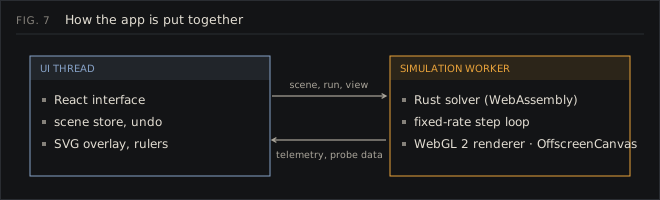
The repository
Section titled “The repository”rust-core/ the solver (Rust, compiled to WebAssembly) src/sim.rs Simulation: fields, kernels, sources, probes, public API src/cpml.rs absorbing boundary profiles and state src/sources.rs waveforms, point sources, TF/SF line with its 1D grid src/materials.rs material table and update coefficients (incl. Drude) src/geometry.rs clipped rasterisation of shapes into the material grid src/monitors.rs probe ring buffers and the FFT tests/physics.rs validation tests pkg/ generated bindings, committed (see Building)web/ the app (React, TypeScript, Vite) src/engine/ worker, WebGL renderer, protocol, device benchmark src/scene/ scene document: types, presets, validation, files, links src/state/ zustand stores, undo history, commands src/ui/ components, icons, design tokensdocs/ this site (Astro Starlight)tools/ screenshot and figure generatorsThe solver
Section titled “The solver”All state lives in one Simulation struct. Fields are flat f32 arrays in row-major order. Each cell also stores a one-byte material id; the update coefficients are looked up from a 64-entry table and rebuilt only when the geometry or the table changes.
TM and TE share one pair of kernels through the duality described in How the solver works. The kernels walk the grid row by row with iterators over equal-length slices, which removes bounds checks and lets LLVM vectorise them for WebAssembly SIMD. The absorbing boundary is applied as a correction pass over the edge strips only, so the interior loops stay branch-free.
Sources and probes live inside the solver. JavaScript calls step(n) once per frame and the solver injects sources and records probes at every step, with no copies across the WebAssembly boundary. Field data is read in place through a pointer into WebAssembly memory.
The compiled module is about 80 KB (35 KB gzipped).
The worker
Section titled “The worker”web/src/engine/sim.worker.ts owns the solver and the time loop. When the browser supports it, the canvas is transferred to the worker as an OffscreenCanvas and drawn there with WebGL 2, so the interface thread never touches field data. On older browsers the worker sends each frame to the main thread, which draws it with the same renderer class.
The loop is driven by requestAnimationFrame on the main thread with back-pressure: a new tick is sent only when the previous one is done. Each tick computes how many steps the requested speed needs for the elapsed wall time and caps that at a time budget, so 60 Hz and 120 Hz displays run the simulation at the same rate.
At start-up the worker times a few dozen steps on a 512² grid and picks the largest grid the device can carry at normal speed (engine/quality.ts).
The renderer
Section titled “The renderer”One full-screen triangle and one fragment shader. The field is uploaded as an R32F texture each frame and interpolated by hand (float textures are not filterable on every GPU). Material ids are a second R8UI texture; the shader draws hatching and one-device-pixel outlines where the id changes. Colour maps are 256 × 1 lookup textures. Exposure is automatic: every few frames the worker takes the 99.5th percentile of a strided sample of the field.
The interface
Section titled “The interface”The scene (geometry, sources, probes, materials and settings, all in nm) is a plain object in a zustand store and the single source of truth. Edits replace it immutably, which makes undo a stack of references. A small bridge (state/engine.ts) watches the store and sends the parts that changed to the worker.
Components subscribe to narrow selectors, so the 10 Hz telemetry only re-renders the status bar. Charts draw straight onto their own canvas when data arrives, outside React’s render cycle.
Everything that comes from outside (scene files, share links, local storage) goes through scene/validate.ts before it reaches the store.